![Koble-RGB_Lockup-Color.png]](https://koblesystems.com/hs-fs/hubfs/Koble/Logo/Koble-RGB_Lockup-Color.png?height=40&name=Koble-RGB_Lockup-Color.png)
Chargebacks/Disputes are never fun. They can be time consuming, costly, and if you have too many of them, they can hurt your processing rates. The best thing is to prevent a dispute. We cover that in this article here: Best Practices to Prevent Credit Card Fraud
But, even if you do everything right, disputes can happen. When dealing with a dispute, there are a few things you can do to make sure you are taking the right steps.
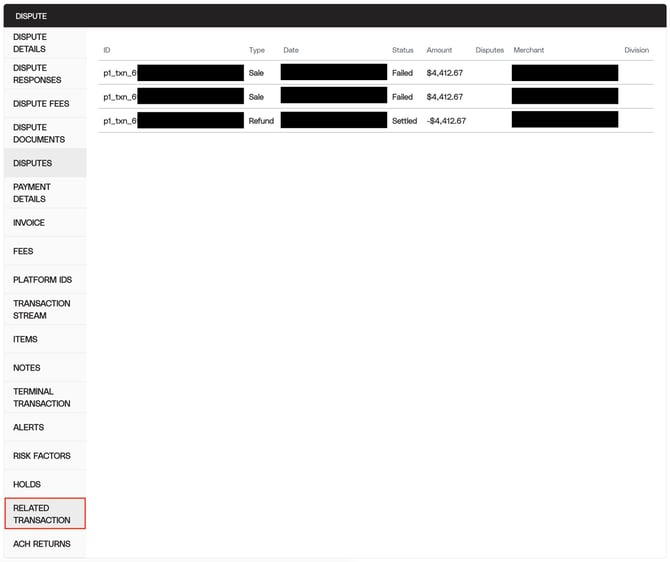
- Review the transaction & related transactions. Has this customer purchased from you multiple times? Have you already refunded them for this transaction? Having this information can help strengthen your case. You should review them both in EBMS and in Koble Payments.
- You can find transactions related to the disputed one in the Koble Payments Portal by logging in and clicking on "Disputes" under the "Payment" section on the left side. Then click on "Dispute Details" next to the dispute. Then scroll all the way down and click on "Related Transactions".
- Note: Related transactions in Koble Payments portal uses the last 4 of the card number along with a few other pieces of information to try and identify related transactions. If some of the other information is missing or different, a related transaction may not show or unrelated transactions may show (Like if you use a generic customer in EBMS, and 2 different cards with the same last 4 digits are both run, they may both show under related transactions).
- Pull a copy of the invoice(s) from EBMS. You'll want to pull a PDF of the sale, any related transactions (showing shipping and/or billing address the same as the disputed one), and if you already refunded the money, the refund invoice. You will need these if you decide to fight the chargeback.
- Pull any other evidence you may have. This may be signatures, photocopies of ID's, communication history, delivery photos, matching address information, etc.
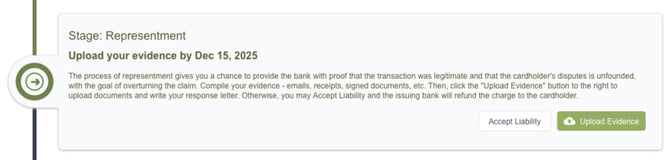
- Decide how you want to proceed. After you have reviewed everything, you have to decide what to do: Fight the dispute, or accept liablity and give the customer their money back.
- If you decide to accept liability, you simply click the "Accept Liability" button and the money will be given back to the customer and the dispute will be closed.
- If you decide to fight the chargeback, click the "upload evidence" button, and then provide a statement explaining what happened, upload the document(s), and submit it for review.
If you have any questions during this process, please don't hesitate to reach out to our support team.