Brian Esh

Your ERP should continue to work for you as your business changes. New product lines, additional locations, or different ways of working can all bring new demands on your software.
ERP customizations can help you build on the system you've already invested in, adapting it to new needs without starting from scratch. But how do you know when a customization is actually worth it?
Let’s look at what customizations can do, when they’re worth considering, and how to make sure you’re investing in something that will serve your business well over the years.
What is ERP customization?
ERP software is built with a core set of tools that serve a broad range of businesses, with room to make adjustments where needed.
There are two ways those adjustments typically happen: configuration and customization.
Configuration means changes using tools that already exist in your ERP. You might adjust user permissions, change how information is displayed, or turn on a feature your team hasn’t used before.
Customization involves developing or modifying functionality to meet a need that the standard software doesn’t already address. It could be something small, like adjusting your system to automatically follow your company’s specific pricing rules. Or it could be a larger project, like building a custom order picking app for your warehouse team to use.
The important thing to understand is that you have options. And you don't have to know exactly what needs to be built before bringing a problem to your ERP provider.
A good ERP consultant can help you work through what's happening in your business, what the software is already capable of, and whether developing something new would actually make the process better.
What are some common ERP customizations?
Customizations can take quite a few different forms. Here are some examples:
- Data customizations: Adding fields to track information specific to your business, such as certain equipment specifications or customer requirements.
- Reporting customizations: Building a report that pulls together the numbers your team regularly needs instead of having to gather them from several places.
- Policy customizations: Adding warnings, restrictions, or approval requirements. For example, requiring manager approval before an employee applies a discount above a certain amount.
- Workflow customizations: Making a common task easier by reducing the number of steps involved or allowing employees to complete several actions at once.
- Automations: Having the software handle repetitive work that someone would otherwise need to complete manually.
- Integrations: Connecting your ERP with another application, such as a freight provider, eCommerce platform, dispatching tools, or phone system.
- Custom applications: Building a separate tool that works with your ERP. For example, a web-based picking app that works with specialty bar codes.
Depending on your ERP, some of these examples might already be possible with existing features or settings. Others could require custom development.
When does customizing your ERP make sense?
Let's say your purchasing manager comes to you with a request for a new screen in your ERP. They've got a pretty good idea of what information it should display and which buttons they need.
You could take that list straight to your ERP provider and ask them to build it. But a good ERP partner will want to know why you need that screen in the first place, taking time to understand the pain points in your current purchasing process before recommending a solution.
They'll ask questions like:
- What are you trying to accomplish?
- How are you currently doing it?
- Are you doing anything manually to work around the current process?
- Who needs this, and how often?
- What happens when the current process doesn't work?
These conversations help uncover what's actually causing the frustration.
So, back to our purchasing manager.
After talking through the process with your ERP consultant, you discover that the real bottleneck is how purchase orders are prepared for certain vendors. The manager has to look up information in several places, make the same adjustments over and over, and double-check everything before sending the orders out.
Your consultant understands how the ERP handles purchasing, and they're taking the time to understand how your business works with its vendors. They may have seen similar challenges with other customers and know which approaches have worked well.
With that knowledge, they can help you figure out whether an existing feature will do the job or if a customization would make more sense. And if custom development is the right choice, they'll have a much clearer picture of what needs to be built.
When might customization be unnecessary?
Not every frustration with your ERP needs to be solved by building something new.
Sometimes the software already has a feature that will do what you need, but your team hasn't learned to use it yet. Other times, a process that worked well in your old system may no longer be the best way to get things done.
This is another place where an experienced ERP consultant can be especially helpful. They know what the software can do, and they can help you look at a problem from a different angle before you invest in custom development.
Five ways to address the gap in your ERP
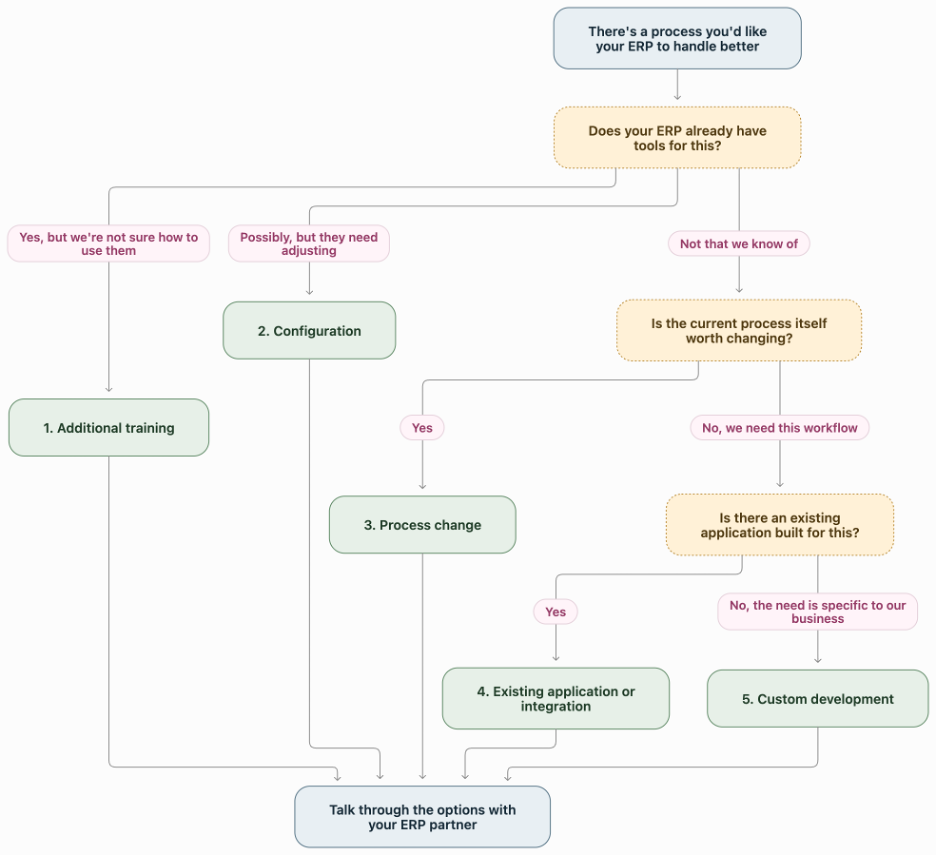
Depending on the problem, your ERP partner may recommend one of several approaches:
1. Additional training: Your ERP may already have the functionality you need, but your team hasn’t learned how to use them yet. Sometimes sitting down with a consultant for an hour can eliminate a workaround that’s been frustrating your employees for months.
2. Configuration: Maybe you just need to change a setting, adjust permissions, or set up an existing feature differently. That may be enough to get the software working the way you need it to.
3. A process change: Think about why your team does things the way they do. Is there a good reason for it, or is it a process that developed years ago because your previous software couldn’t handle something?
4. An existing integration or application: There may already be an application out there that does just what you need. Integrating it with your ERP could be an easier, more affordable option than building something new.
5. Custom development: If the other options don’t solve the problem, it may be worth building something specifically for your business.
Your ERP partner shouldn’t default to selling you a customization every time something isn't working quite right. They're there to help you find the best way forward.
That means taking the time to understand your business, talking through the options with you, and recommending what makes the most sense. Sometimes that's a customization. Other times, it's a simpler solution that gets you the same result without the extra development cost.
What does a successful customization look like?
A customization shouldn’t be considered successful just because a developer built what you asked for and everything technically works. What matters is whether it makes a meaningful difference to your business.
Here are five things we’d look for:
1. It solves the problem you set out to fix.
This sounds obvious, but it’s easy to get caught up in discussing features and lose track of why you wanted the customization in the first place.
Maybe your goal is to make purchasing more predictable when your business has unusual seasonal demand. Or to get a more accurate picture of job costs when materials, labor, and outside processing all need to be accounted for differently. Perhaps you want to make sure your service department follows a specific inspection and approval process without relying on paperwork or someone remembering every step.
Before any development begins, you and your ERP partner should be clear on what needs to improve. That gives the development team something to build toward and gives you a way to tell whether the finished customization actually solved the problem.
2. It makes your employees’ job easier.
The new setup should fit naturally into how your team works, reducing unnecessary steps and making the information they need easier to access.
That means your ERP provider needs to understand what employees are actually doing throughout the day, not just what the process looks like on paper.
The people using the software every day can often point out small details that make a big difference. Involving them in the conversation helps your provider build something that's genuinely useful, rather than something that technically works but creates new frustrations.
3. It works for the rest of your business, too.
Something that makes purchasing easier shouldn't create new problems for the warehouse or accounting team.
Because your ERP connects so many parts of the business, even a relatively small change can have effects beyond the department requesting it.
An experienced ERP provider understands how those pieces fit together. They can help you think through what a change to one workflow might mean for the employees and processes that depend on it, so you're not solving one problem only to create another.
4. It’s worth what you’re paying for it.
Removing three clicks from a screen that’s used twice a month might be nice, but is it worth paying someone to develop and maintain that change?
Now compare that with a customization that saves three employees several hours every week or helps prevent mistakes that regularly hold up customer orders.
There’s a much stronger case for investing in the second one.
Your ERP partner should help you weigh the expected improvement against the cost of building and maintaining it. They may also be able to suggest a smaller or simpler approach that solves the same problem for less.
5. It can keep serving your business over time.
Your ERP will continue to receive updates, and you want your customizations to keep working right along with it.
A good customization should be built to handle foreseeable software updates without needing major changes every time a new version comes out. It should also be well documented so it's easier to maintain and troubleshoot if something does come up.
This is another reason why it pays to work with an experienced ERP provider. A team that knows how the software works behind the scenes, and what's coming down the road, can build customizations with those future updates in mind. That means fewer headaches for your team and a better return on your investment over time.
Start with what matters most.
You don't have to tackle everything at once.
If you've identified seven different ways you'd like to improve your ERP, your provider can help you sort through them and decide where to start. Some changes might have a much bigger impact than others. Some may be relatively simple, while others require more planning or depend on another improvement happening first.
By working through those priorities together, you can start with the changes that make the most sense for your business and build from there.
Once the first improvement is in place, give your employees time to use it and see what you learn. You might discover that it solved more than you expected, or find a better way to approach the next project.
Question to work through with your ERP partner
You don't need to have the technical solution figured out before bringing a problem to your ERP provider. That's part of what they're there to help with.
But it does help to explain what's happening in your business, where your team is running into problems, and what you'd like to improve.
Here are five questions you and your consultant can work through together:
1. Is this a recurring problem that’s meaningfully affecting our business?
2. Can our ERP already do what we need?
3. Would changing the process be simpler than changing the software?
4. What would improving this process actually save us?
5. Is the improvement worth the cost of developing and maintaining it?
You bring the knowledge of your business. Your ERP partner brings their knowledge of the software and experience helping other businesses work through similar challenges. Together, you can figure out whether customization makes sense and what the next steps should look like.
Make more of your ERP investment.
Your business won't operate exactly the same way five years from now as it does today. Your ERP should give you room to make changes along the way.
Whether you're planning an ERP implementation or looking for ways to get more from the software you already use, having an experienced ERP partner makes a difference. Someone who understands your workflows, knows what the software can do, and can help you figure out which improvements are worth pursuing.
Sometimes that means developing something new. Other times, it means finding a better way to use what you already have.
Either way, the right partnership helps you keep getting more from your ERP as your business changes.