![Koble-RGB_Lockup-Color.png]](https://koblesystems.com/hs-fs/hubfs/Koble/Logo/Koble-RGB_Lockup-Color.png?height=40&name=Koble-RGB_Lockup-Color.png)
How EBMS 9.0 stores data
EBMS 9.0 keeps every company's data in one PostgreSQL database on the EBMS server, replacing the DBF files that EBMS 8.6 and earlier kept in the data folder.
Every workstation talks to the PostgreSQL database on the EBMS Server
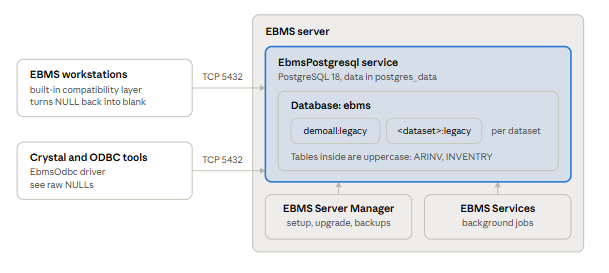
- Same program, new storage. EBMS still reads and writes tables the way it did with DBF files. A compatibility layer built into EBMS translates those calls into SQL, so screens, scripts and most reports work as before.
- One database, one schema per dataset. The database is named
ebms. Each dataset gets its own schema named<dataset>:legacyin lowercase, such asdemoall:legacy. Table names inside it are uppercase, such asARINVandINVENTRY. - Company ID is not the dataset name. A company with ID
DEMcan live in datasetdemoall. Look up the dataset before writing queries or restoring a backup. - Workstations connect over the network. Each EBMS workstation connects directly to PostgreSQL on the server over TCP port 5432. EBMS Services and EBMS Server Manager run on the server itself.
EBMS 9.0 supports PostgreSQL 17 and 18; new installs from EBMS 9.0.241.131 on get PostgreSQL 18.6, and existing PostgreSQL 17 servers are offered the upgrade.
|
PostgreSQL version |
Status in EBMS 9.0 |
What happens |
|---|---|---|
|
18 (18.6 shipped) |
Current |
Installed on new servers by the EBMS installer. |
|
17 |
Supported, upgrade recommended |
EBMS keeps running. Server Manager offers the upgrade to 18 each time it opens. |
|
16 or older |
Not supported |
EBMS has never shipped on these versions. |
Server requirements for PostgreSQL
- Windows x64 with the Microsoft Visual C++ 2015-2022 x64 runtime. The installer and the upgrade install it if it is missing.
- Free disk space for a full backup file on the drive that holds the EBMS data folder. The 17 to 18 upgrade writes one before it starts.
- System Requirements
The EBMS server install puts PostgreSQL in place unattended; EBMS owns its service, password and settings, so manage them through EBMS Server Manager rather than by hand.
|
Item |
Value |
|---|---|
|
Windows service |
|
|
Program folder |
|
|
Data folder |
|
|
Port |
5432 |
|
Backup folder |
|
Leave PostgreSQL to Server Manager. EBMS manages the database password and the PostgreSQL settings it needs. Do not change either directly; contact Koble support first if you think a setting needs to change.
Network access. Workstations reach the database over port 5432. Allow that port only from your office network, and never open it to the internet. The EBMS Server Manager install will open the required firewall port.
Backups and restoresBack up EBMS 9.0 with the archive schedule in EBMS Server Manager; copying the postgres_data folder while PostgreSQL is running does not produce a usable backup.
Scheduled archives (recommended). In Server Manager settings, add an archive schedule. Pick the folder, the days, the companies and how many archives to keep (1 to 999).
- Each run writes one file per company:
<dataset>_archive_<yyyyMMdd_HHmmss>.backup. - Files are standard PostgreSQL custom-format dumps (
pg_dump -Fc) of that dataset's schemas. - Older archives past the keep count are deleted automatically.
- Server Manager emails the result to the EBMS administrators, including any company it skipped.
- Run Now starts an archive immediately. Copy puts the matching
ServerUtilities.exe /backup ...command on the clipboard for use in your own scheduler.
One-off backup. On a company's tile in Server Manager, choose Create Backup. You can leave out the data of selected tables to make a smaller file, for example to send to support.
Restore. In Server Manager, use Add Dataset > Restore and pick a company .backup file. It can be restored under a different dataset name, so you can bring up a copy beside the live company. The whole-database full_ebms_backup.dump that the PostgreSQL upgrade writes holds every company at once; restoring it is a pg_restore job for Koble support, not an Add Dataset step.
The upgrade is one click in EBMS Server Manager: it backs up the database, upgrades it in place, and switches the service to PostgreSQL 18, with EBMS offline for the duration.
When you see it. After the server is updated to EBMS 9.0.241.131 or later, Server Manager shows Upgrade to PostgreSQL 18 each time it opens on a PostgreSQL 17 server. Install PostgreSQL 18 starts the upgrade. Cancel keeps PostgreSQL 17 running and asks again next time.
Before you start
- Schedule downtime and have every user close EBMS. The upgrade stops PostgreSQL, which disconnects everyone.
- Check free space on the drive holding the EBMS data folder. The full backup goes to
<EBMS data path>\backups. - Confirm a recent scheduled archive exists somewhere other than the server.
- Run Server Manager on the EBMS server itself, as a Windows administrator.
What the upgrade does
- Confirms it can sign in to the database.
- Writes a full backup of the whole database to
<EBMS data path>\backups\full_ebms_backup.dump. An existing file is never overwritten; the next one isfull_ebms_backup_1.dump. - Unpacks PostgreSQL 18 to
C:\Program Files\PostgreSQL\18and installs the Visual C++ runtime if needed. - Removes broken logical replication slots, which would otherwise block the upgrade.
- Stops the
EbmsPostgresqlservice. - Creates an empty PostgreSQL 18 data folder,
postgres_data_postgresql_18_new, with the same data checksum setting as the old one. - Runs PostgreSQL's compatibility check (
pg_upgrade --check). If it fails, the new folder is deleted and PostgreSQL 17 starts again with nothing changed. - Runs
pg_upgrade --link. Data files are linked into the new folder, not copied, so this is fast and needs little extra disk. From this point PostgreSQL 17 can no longer start on the old folder. - Swaps the folders:
postgres_databecomespostgres_data_postgresql_17_pre_upgrade, and the new folder becomespostgres_data. The service is pointed at the PostgreSQL 18 programs. - Starts PostgreSQL 18 and applies the EBMS settings. Once it confirms the service is running version 18 from
postgres_data, it deletes the old PostgreSQL 17 folder. - Rebuilds query statistics in the background. EBMS is usable but can be slower until this finishes. It keeps running if Server Manager is closed, and is retried the next time Server Manager opens if it fails.
Check the result
- Server Manager opens without an error and lists every company.
<EBMS data path>\postgres_data\PG_VERSIONcontains18.- A workstation logs in to EBMS and opens recent documents.
- The "Updating PostgreSQL 18 statistics" message in Server Manager has cleared.
Going back to PostgreSQL 17
There is no automatic rollback. The PostgreSQL 17 data folder is deleted at the end of a successful upgrade, so the way back is to reinstall PostgreSQL 17 and restore full_ebms_backup.dump. Contact Koble support for this, and keep that file until you are satisfied with the upgrade.
Custom Crystal reports and other ODBC tools read PostgreSQL directly, so they see empty values as NULL where EBMS itself, and every 8.6 report, saw a blank.
Why reports change after moving from 8.6. DBF files had no NULL: an empty text field was "", a logical field was always true or false. The 8.6 to 9.0 conversion stores empty values as NULL. EBMS screens and scripts still see a blank, because its compatibility layer converts NULL back. Crystal connects through the PostgreSQL ODBC driver EBMS installs (EbmsOdbc) and gets the raw NULL.
What it looks like. A formula that never fired in 8.6 now fires, a suppression condition flips, or a total changes. Outer-joined tables with no matching row behave the same way.
How to fix a Crystal formula.
- Keep the formula's null handling on Exceptions for Nulls and guard each field that can be empty:
Not IsNull({ARINV.SHIP_VIA}) and {ARINV.SHIP_VIA} = "UPS". - Or switch it to Default Values for Nulls, which turns NULL into
"",0or false. Under this settingIsNull()always returns false, so rewrite any logic that depends on it. - Compare logical fields to
TrueorFalse, never to"".
Connecting other tools. Reporting tools see the schema and table names described in How EBMS 9.0 stores data. Use them to read data only; changes made outside EBMS skip its business rules. Contact Koble support to set up a reporting connection.
TroubleshootingIf an upgrade message says PostgreSQL was intentionally left stopped, do not start the service by hand and do not delete or rename any postgres_data folder; reopen Server Manager, and call Koble support if the message returns.
The reason PostgreSQL will not start is written to the Windows Application event log and to the log folder inside postgres_data.
|
Message starts with |
What it means |
What to do |
|---|---|---|
|
...intentionally left stopped |
The upgrade stopped partway and protected both data folders. |
Reopen Server Manager; it finishes a pending switch-over by itself. If the message returns, send its full text to support. |
|
The PostgreSQL upgrade compatibility check failed |
|
Send the full message to support. |
|
Error creating a backup of the EBMS database |
The full backup could not be written, usually from lack of disk space. Nothing was changed. |
Free space on the data drive and reopen Server Manager. |
|
Service 'EbmsPostgresql' did not stop within 30 seconds |
Something kept PostgreSQL busy. Nothing was changed. |
Close EBMS on every workstation, stop EBMS Services, and retry. |
|
...could not start because a required DLL is missing (0xC0000135) |
The Microsoft Visual C++ runtime is missing or too old. |
Install the Microsoft Visual C++ 2015-2022 x64 redistributable and retry. |
|
The pre-upgrade backup directory already exists |
An earlier attempt left |
Do not delete it. Contact support. |
|
Updating PostgreSQL 18 statistics after the upgrade did not finish |
The post-upgrade statistics rebuild was interrupted. EBMS works, possibly slower. |
Click Retry, or reopen Server Manager. |
|
The EbmsPostgreSQL service is stopped and could not be started |
PostgreSQL will not start, often from a bad |
Check the event log and the |